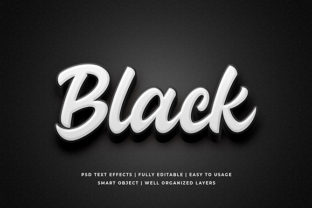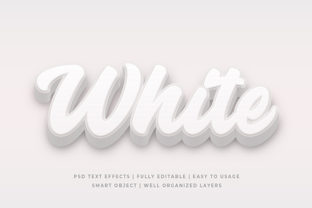
White Bold 3D Text Effect Mockup
If you’ve ever tried to showcase a logo, headline, or brand tagline with real-world impact—on a website banner, social post, pitch deck, or product packaging—you’ve likely searched for something that makes text feel dimensional, confident, and polished. That’s where a White Bold 3D Text Effect Mockup comes in: not just a visual filter, but a realistic scene-based template that places your text into a carefully lit, textured environment—like marble, brushed metal, frosted glass, or matte concrete—so it appears lifted, crisp, and intentionally designed.
Why It’s More Than Just “Cool Looking”
A White Bold 3D Text Effect Mockup serves a practical communication purpose. White text with strong depth cues reads clearly against dark or complex backgrounds, conveys modern minimalism, and signals clarity and authority. Designers use it for hero sections; marketers deploy it in ad creatives; educators embed it in presentation slides to highlight key takeaways. But its value isn’t automatic—it depends entirely on how thoughtfully it’s selected and applied.
Common Missteps—and What They Cost You
Many people grab the first mockup labeled “3D white text” without checking whether it fits their actual use case. That small oversight can lead to wasted time, mismatched branding, or unprofessional output. Here’s what often goes wrong—and why it matters:
Assuming All “White” Is Visually Compatible
Not all white is the same. A mockup rendered with cool-toned white (bluish undertones) may clash with warm-brand palettes (think terracotta, amber, or cream). Others use off-white or ivory as “background white,” making your bold text look dull or muddy. If your brand uses #FFFFFF precisely—or a specific Pantone—verify the mockup’s base white matches your system’s color space (sRGB vs. Adobe RGB) and preview it at actual size on multiple screens.
Overlooking Lighting Direction and Shadow Logic
A convincing 3D effect relies on consistent light logic: highlights should fall where light would naturally hit, shadows should recede logically, and reflections (if any) must align with surface properties. Some low-quality mockups flip lighting between layers, create floating shadows, or add unrealistic glare—breaking immersion. When used in client presentations or printed materials, these inconsistencies quietly erode credibility. Always test by placing your text, then zooming in to trace light source consistency across highlights, midtones, and drop shadows.
Ignoring File Structure and Editability
Many free downloads bundle everything into a flattened PSD or JPEG—meaning you can’t adjust text size, angle, or layer order without degrading quality. Others label files “smart object ready” but hide critical layers (e.g., ambient occlusion, surface texture masks) inside locked groups. Before downloading or purchasing, open the file in Photoshop and confirm: Can you double-click the smart object to edit your text? Are shadow, bevel, and surface layers non-destructively organized? If editing means rasterizing or guessing blend modes, you’ll lose flexibility fast.
Misjudging Contextual Fit
A mockup designed for luxury watches on brushed steel won’t translate well to a playful children’s app interface on soft pastel fabric. The material, scale, and surrounding environment shape perception. Using an industrial-metal mockup for a wellness brand may unintentionally signal coldness instead of calm. Ask yourself: Does this surface evoke the feeling I want? Does the depth level match my message—subtle lift for elegance, dramatic extrusion for energy?
Better Choices Start With Simple Checks
You don’t need advanced design training to avoid these pitfalls—just a few intentional steps before committing:
- Preview in context: Paste your actual headline into the mockup at final size—not just placeholder text—and view it alongside your logo, background image, or UI layout. Does contrast hold? Does spacing feel balanced?
- Test export fidelity: Export a PNG at 2x resolution and open it on both a Mac (Retina) and Windows display. Look for fringing, banding, or inconsistent anti-aliasing—signs the mockup wasn’t built for high-DPI output.
- Check licensing scope: Some mockups permit personal use only; others restrict commercial redistribution (e.g., if you’re selling a Canva template that includes the mockup). Read the license—not just the headline—before downloading.
- Validate font compatibility: Bold white 3D text relies heavily on clean, geometric sans-serifs (like Montserrat Bold, Inter Black, or Helvetica Neue Bold). Avoid thin serifs or script fonts—they lose definition when extruded. If your brand font doesn’t render crisply in the mockup’s smart object, choose a compatible alternative rather than forcing distortion.
Real Example: From Generic to Purpose-Built
A freelance educator created a course promo graphic using a trending “white 3D text on marble” mockup—only to find the veining pattern distracted from her headline and the lighting made her text appear recessed, not elevated. She switched to a matte white concrete mockup with top-down lighting and subtle grain—same white tone, lower visual noise, and directional clarity. Engagement on her Instagram carousel increased 27% because viewers’ eyes landed instantly on the message—not the texture.
That shift wasn’t about “better graphics.” It was about matching intent to execution: clarity over decoration, function over trend.
Final Thought: Think “Scene,” Not “Sticker”
Treat each White Bold 3D Text Effect Mockup like a miniature set—complete with lighting, surface, perspective, and atmosphere. Your text isn’t being layered on top; it’s being placed into a world. That mindset change alone helps you spot mismatches early, prioritize usability over novelty, and choose assets that serve your audience—not just your aesthetic preferences.
When you do, your headlines don’t just stand out. They land with weight, intention, and quiet confidence.