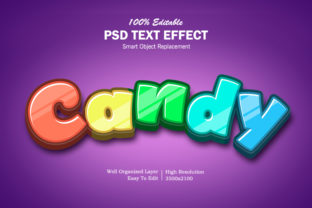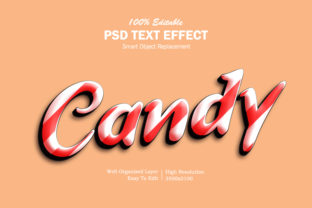
Candy 3D Text Effect
If you’ve ever clicked through design galleries, social media reels, or email headers and paused at text that looks glossy, vibrant, and almost good enough to lick—you’ve likely seen the Candy 3D Text Effect in action. It’s not just a trend; it’s a visual shorthand for energy, playfulness, and approachability. Think of bold headlines on a dessert brand’s landing page, animated Instagram story titles for a kids’ podcast, or eye-catching banners for a holiday sale—each using that signature sugary sheen, soft depth, and luminous highlights. But while the effect looks deceptively simple, getting it right—without compromising speed, accessibility, or scalability—is where many creators stumble.
Assuming “Candy” Means “Easy” — And Why That Backfires
One of the most common missteps is treating the Candy 3D Text Effect as a one-click filter—like slapping on a preset in Canva or dragging a Photoshop layer style and calling it done. In reality, true candy-like depth relies on thoughtful interplay between light direction, surface gloss, subtle shadow diffusion, and chromatic contrast. A rushed version often ends up looking flat, oversaturated, or oddly metallic instead of sweet and tactile.
For example, a small bakery owner once used a free online generator to create a “Candy 3D Text Effect” for their Facebook cover image. The result had harsh white highlights clashing with neon pink text against a warm background—visually jarring and hard to read at smaller sizes. Worse, the file was a low-res PNG that pixelated when zoomed. What looked fun on desktop vanished on mobile, hurting engagement.
Better approach: Start with vector-based tools (like Figma, Illustrator, or even modern CSS with text-shadow and filter: drop-shadow()) so your text stays crisp at any size. Layer highlights manually—not just one bright stripe, but a soft inner glow + a directional highlight + a gentle ambient shadow. Match the gloss intensity to your brand voice: high shine for a candy shop, softer sheen for an educational app teaching kids about nutrition.
Overlooking Compatibility and Performance
Many free Candy 3D Text Effect resources come as heavy PSD files, bloated After Effects projects, or JavaScript libraries that load multiple MBs of assets. That’s fine for a hero section on a portfolio site—but not for a Shopify product page loading on a 3G connection in rural Indonesia. Slow-loading 3D text can delay perceived performance, increase bounce rates, and even hurt SEO rankings.
Also, consider screen readers and color contrast. Glossy effects often reduce text contrast by adding semi-transparent overlays or blending modes. A bright yellow “SALE” button with candy-style 3D depth might fail WCAG AA contrast requirements against a light background—making it inaccessible to users with low vision.
What to check before using:
- Does the output render cleanly across browsers—including Safari and older Edge versions?
- Is the final file lightweight? Aim for under 100 KB for static use, under 50 KB for repeated UI elements.
- Does the text remain legible at 120% zoom and in Windows High Contrast Mode?
- If using CSS or SVG, does it degrade gracefully if JavaScript fails or styles don’t load?
Mistaking Style for Substance
The Candy 3D Text Effect shines brightest when it supports intent—not distracts from it. Yet it’s easy to overapply: stacking it on navigation menus, body copy, or form labels. That undermines readability and weakens hierarchy. A marketing team once added candy-style 3D to every headline in their email campaign—only to discover open rates dropped 18%. Recipients reported visual fatigue and difficulty scanning content.
Remember: texture has weight. Candy 3D implies sweetness, youth, celebration—or sometimes nostalgia. It rarely conveys authority, precision, or calm. Using it for a law firm’s “Terms of Service” page or a hospital’s appointment reminder feels tonally mismatched and erodes trust.
Practical tip: Reserve the Candy 3D Text Effect for moments where emotion and memorability matter most—launch announcements, limited-time offers, interactive quizzes, or branded social assets. Keep supporting text clean and functional. Let the candy be the cherry on top—not the whole sundae.
Downloading Without Verifying Licensing or Source
Free “Candy 3D Text Effect” downloads flood design forums and GitHub repositories—but not all are safe or legally clear. Some bundles include fonts without commercial licenses, embed third-party scripts with tracking, or rely on deprecated libraries no longer maintained. One freelance designer unknowingly used a free Figma plugin that auto-injected affiliate links into exported assets—only catching it after a client flagged suspicious URLs in their live banner.
Others assume “free = open,” then get surprise copyright claims when scaling usage across client work or merchandise. Always verify whether the resource permits commercial use, modification, and redistribution—and whether attribution is required.
Before downloading or installing:
- Read the license file—not just the README summary.
- Check the author’s reputation: Are they active, responsive, and transparent about dependencies?
- Scan code-based tools with tools like Snyk or browser dev tools for unexpected network calls.
- When in doubt, build your own lightweight version using documented CSS techniques or SVG filters—it’s faster to learn than you think, and fully under your control.
Skipping Testing in Real Contexts
A Candy 3D Text Effect may look perfect in isolation—a glowing “SUMMER SALE” on a white artboard—but fall apart beside real imagery, video backgrounds, or dynamic content. Gloss highlights can vanish into a busy photo. Soft shadows may disappear on dark mode. And animated candy text? It might autoplay awkwardly on a user’s muted device or trigger motion sensitivity preferences.
Test early and often—not just on your primary monitor, but on actual devices: an older iPhone SE, a mid-tier Android tablet, and a laptop with reduced motion enabled. Try toggling system-wide dark mode and zoom settings. Paste your text into a real email client preview or CMS editor to see how it renders alongside live content.
Realistic example: An educator building a gamified learning module used candy-style 3D buttons for quiz answers. They tested only in Chrome on desktop—then discovered the buttons flickered on iOS Safari due to unsupported CSS transforms. A quick swap to transform: translateZ(0) + hardware-accelerated opacity fixed it. That small test saved hours of post-launch troubleshooting.
Ultimately, the Candy 3D Text Effect isn’t about technical wizardry—it’s about intentionality. When used with care, it adds delight without diluting clarity. When rushed, it adds noise without meaning. Whether you’re launching a new product, designing a classroom slide deck, or refreshing your blog’s header, let the candy enhance—not override—the message you want people to remember, understand, and act on.