Stay Cool 3D Text Effect Mockup: A Practical Guide for Designers and Marketers
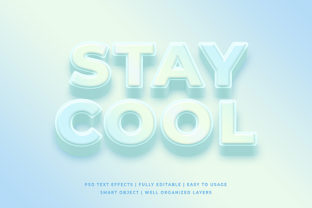
The Stay Cool 3D Text Effect Mockup is a specialized design resource that renders realistic, stylized 3D typography in a controlled, editable environment—typically as a layered PSD or smart-object-based file. Unlike generic 3D text generators or real-time rendering tools, it provides a pre-styled, photorealistic scene where users replace placeholder text to instantly visualize how bold, dimensional lettering would appear on physical or digital surfaces—like signage, apparel, packaging, or social media banners. What sets it apart is its intentional aesthetic: relaxed, contemporary, and subtly playful—evoking summer vibes, casual branding, or lifestyle-focused messaging without leaning into kitsch or over-polished corporate minimalism.
How It Differs From Broader 3D Typography Resources
Most 3D text mockups fall into two broad categories: versatile technical templates and style-specific assets. The Stay Cool 3D Text Effect Mockup belongs firmly to the latter. While many mockups prioritize neutrality—offering flat lighting, neutral backdrops, and adjustable angles for maximum reuse—the Stay Cool variant embraces mood. Its lighting is warm and directional, its shadows soft but defined, and its surface texture often includes subtle gradients or matte finishes that reinforce a laid-back, confident tone. This makes it less suitable for high-contrast tech branding or formal institutional use—but highly effective for wellness brands, beverage labels, festival promotions, or creative studio portfolios aiming to convey approachability and energy.
Compared to real-time 3D tools like Blender or Adobe Substance 3D, the Stay Cool 3D Text Effect Mockup requires no modeling knowledge, rendering time, or hardware investment. You don’t adjust extrusion depth, bevel radius, or material roughness manually—you simply type your text, tweak color via layer styles, and export. That tradeoff—speed and consistency over granular control—is central to its value proposition.
Strengths in Real-World Use Cases
Where this mockup shines is in rapid visual communication. Consider a small coffee roaster launching a new seasonal blend called “Coastal Breeze.” Using the Stay Cool 3D Text Effect Mockup, they can generate three distinct banner options in under 20 minutes: one with mint-green text on a sandy gradient, another in coral on a soft blue background, and a third in crisp white against a textured linen overlay. Each version maintains consistent depth, lighting, and perspective—giving stakeholders a cohesive, professional impression without needing a 3D artist on retainer.
Similarly, social media managers preparing Instagram carousel posts benefit from the mockup’s built-in composition logic. The 3D effect naturally draws attention to the center of the frame, and the subtle drop shadow creates separation from busy backgrounds—reducing the need for additional masking or contrast adjustments. Because the mockup is delivered as a layered file, designers retain flexibility: adjusting text size, applying duotone overlays, or swapping background textures—all while preserving the integrity of the 3D illusion.
Tradeoffs and Limitations to Acknowledge
No mockup is universally adaptable—and the Stay Cool 3D Text Effect Mockup has clear boundaries. Its fixed perspective (often a slight upward angle with moderate depth) limits versatility for applications requiring extreme foreshortening, isometric views, or dynamic camera movement. If your project calls for text wrapped around a soda can or extruded along a curved path, this mockup won’t accommodate it. Likewise, its color palette leans warm and muted; achieving high-saturation neon or metallic chrome effects typically demands manual layer adjustments beyond what the base file supports.
Another practical constraint is scalability. While the mockup works well for web and print-ready outputs up to 3000×2000 pixels, pushing it significantly larger may reveal pixelation in shadow gradients or texture overlays—especially if the original was built at a standard resolution. Users planning large-format prints (e.g., trade show banners) should verify native dimensions before committing to final layouts.
When It Fits—and When It Doesn’t
The Stay Cool 3D Text Effect Mockup is most appropriate when you need speed, stylistic cohesion, and emotional resonance—not technical precision. It fits well in early-stage branding exploration, pitch decks for lifestyle clients, or internal mood board development. It also serves teams with limited access to motion graphics or 3D specialists but still want to present typographic concepts with tangible presence.
Conversely, it’s less ideal when your project demands strict brand compliance across multiple touchpoints—for example, a global bank rolling out a new campaign where every headline must align with exact CMYK specifications, shadow opacity tolerances, and baseline grid rules. In those cases, custom-built templates or vector-based 3D exports (via Illustrator’s 3D effects or dedicated typography plugins) offer tighter control. Similarly, if your audience expects interactivity—like hover-triggered depth shifts or scroll-driven parallax—static mockups, including this one, are inherently insufficient without supplemental development.
Comparing Approaches: Mockup vs. Generator vs. Custom Build
Think of the Stay Cool 3D Text Effect Mockup as occupying a middle ground between convenience and customization:
- Online 3D text generators (e.g., browser-based tools offering instant previews) provide near-zero learning curve and zero file management—but output low-resolution PNGs, lack editable layers, and rarely support brand-aligned lighting or texture.
- Custom 3D builds (using Cinema 4D, Blender, or After Effects) deliver full control over geometry, materials, animation, and output fidelity—but require specialized skills, hours of setup, and ongoing maintenance for revisions.
- The Stay Cool 3D Text Effect Mockup bridges that gap: it’s downloadable, editable in widely available software (Photoshop or compatible alternatives), and balances aesthetic intent with practical efficiency.
This makes it especially useful for freelancers juggling multiple clients, in-house designers supporting fast-turnaround campaigns, or educators demonstrating typography hierarchy without diving into complex 3D pipelines.
Making an Informed Choice
Before selecting the Stay Cool 3D Text Effect Mockup, ask yourself three questions:
- What’s the primary goal? If it’s to quickly convey tone, test readability at scale, or align a team around a visual direction, this mockup delivers efficiently. If the goal is technical documentation, engineering specs, or animated implementation, look elsewhere.
- What’s your workflow tolerance? Do you regularly use Photoshop or similar raster editors? Are you comfortable adjusting layer masks, blending modes, and smart object replacements? If yes—great fit. If your team relies exclusively on Figma or Canva, compatibility may require extra conversion steps.
- How much stylistic alignment matters? The “cool” in Stay Cool isn’t arbitrary—it reflects a deliberate visual language. Review sample renders carefully. Does the warmth, spacing, and shadow softness resonate with your brand voice—or clash with its established identity?
There’s no universal “best” 3D text solution—only the best fit for your constraints, goals, and audience expectations. The Stay Cool 3D Text Effect Mockup earns its place not by being the most powerful tool, but by being reliably effective within its scope: helping communicators express confidence, calm, and clarity—without unnecessary complexity.